
Generate a cash based Profit and Loss report
A profit and loss (P&L) report is usually calculated from all your receivable and payable invoices regardless of whether the invoices have been paid or not.
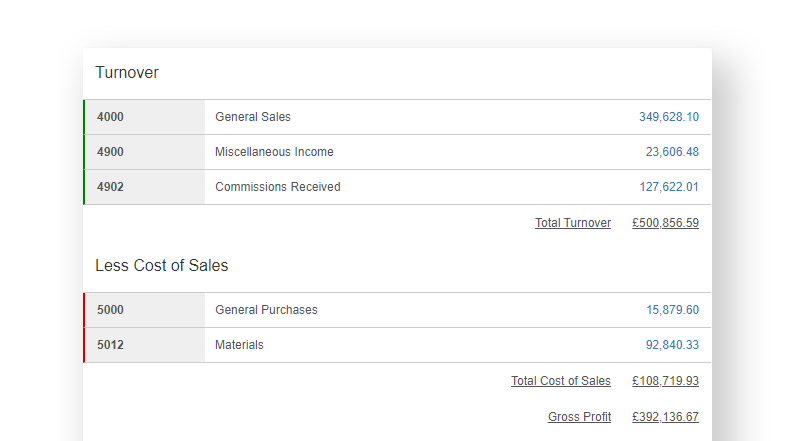
A cash-based P&L report, however, is calculated from your incoming invoice payments and outgoing purchase payments and then stratified by nominal code, depending on how those invoices were categorised. The report will look much the same as a standard P&L, but the underlying calculations may be different.
When to use a cash-based P&L
A cash-based P&L is typically used by smaller businesses that want to get a better view of their cash position. Such businesses may also be eligible to report their earnings and calculate their tax liability with HMRC on a cash basis rather than accrual.
How are the calculations made?
The cash-based P&L report takes a little bit more time to generate than the standard accrual-based P&L report. This is because we need to pull information from a few different sources. Here’s how we make the calculations:
- First, we retrieve all your sales and purchase payments over the reporting period.
- We then analyse what invoices these payments were attached to.
- The itemised lines on each invoice are further analysed to determine the nominal codes to which any itemised amounts were assigned.
- Once the invoice allocations are determined, an additional check is made to find any direct-to-bank taggings, i.e. where amounts are tagged from a bank entry directly to a nominal code.
The report is compiled and delivered as a snapshot. You will need to refresh the report should any underlying information change within the reporting period.
Drilling down on the data
The report is categorised by nominal code and, as with the standard P&L, it will show broader totals for the turnover, cost of sales and expenses to arrive at a net profit amount.
You can drill down on the nominal totals to see a list of payments that make up those totals. You can further drill down on the payment allocations to see the invoice(s) to which the payment is assigned and the nominal entry breakdown.
Flat rate VAT adjustment
If you are VAT-registered and use the Flat Rate Scheme, your sales are typically recorded at the standard rate of VAT. An adjustment is therefore needed to reflect your allocated flat rate VAT percentage and provide a more accurate sales figure.
To calculate this adjustment, we take your total gross cash receipts for the period (including VAT). The VAT included in those receipts at the standard rate (currently 20%) is found by dividing the gross total by 6. Your flat rate VAT is then calculated by applying your allocated flat rate percentage (e.g. 12%) to the same gross total. The VAT adjustment is the VAT collected at the standard rate less the flat rate VAT. This difference is the VAT you have retained under the scheme, and it is added back as an adjustment, increasing your reported income total.
For example, with gross cash receipts of £12,000 and a flat rate of 12%:
- VAT collected at 20%: £12,000 ÷ 6 = £2,000
- Flat Rate VAT: £12,000 × 12% = £1,440
- VAT adjustment: £2,000 − £1,440 = £560
The flat rate turnover is assumes all cash receipts are subject to VAT at the standard rate of 20%. You can remove this adjustment from either the Cash Profit and Loss report or the MTD cumulative update by selecting it in the sales income detail breakdown.
Other things to note
- The cash-based P&L is available for sole traders and non-incorporated partnership accounts that have a power user subscription or are linked to an Affinity account.
- For VAT registered users, amounts are calculated net of VAT as VAT is a balance sheet item.
- Payments on account (prepayments) reside on the balance sheet and will not appear in the profit and loss report.
- Journals are included when a matching contra entry to a bank account is identified.
- Each report is a point-in-time snapshot. Any change to the underlying accounting records in that period will require the report to be refreshed.